


In the world of software development, a Software Requirements Specification (SRS) document plays a crucial role in ensuring the success of a project. At Join.To.IT, we deeply comprehend the pivotal role that SRS documents assume in the triumphant execution of software development endeavors. In this article, we will provide a comprehensive guide to understanding SRS documents, including their importance, key components, a ready-to-use SRS template, and an example for a SaaS product.
The SRS document serves as a bedrock for software development, meticulously delineating both functional and non-functional requirements that must be met for a successful project outcome. The lucid and finely defined software specification requisites play a pivotal role in guaranteeing effective intercommunication among stakeholders, precision in project evaluation, and, ultimately, culminating in a product that resonates with the client's demands.
Comprehending Software Requirements Specification (SRS)
In the realm of software development, crafting a Software Requirements Specification (SRS) document constitutes an imperative for project accomplishment, client gratification, and seamless stakeholder interaction.
An SRS document meticulously lays down the functional and non-functional stipulations of the prospective software, encompassing use cases, system constrictions, and other pertinent particulars. By documenting these prerequisites, we ensure a clear comprehension on part of the development squad regarding project objectives, facilitating an efficient trajectory toward their realization.
Whom is SRS useful for?
The Software Requirements Specification (SRS) document serves as the foundational reference for the entire software development project, providing essential instructions to all teams involved.

This includes:
- Developers: They rely on the SRS to design and implement software that aligns with the specified requirements.
- Testers: The SRS documentation helps testers define the necessary testing procedures to verify that the software meets the stated requirements and fulfills customer expectations.
- Operations: Operations teams can refer to the document to establish effective processes and procedures for deploying the software in service.
- Maintainers: The SRS assists maintainers in setting up post-deployment maintenance processes and procedures for the software.
- Quality Assurance: The SRS serves as a basis for quality assurance teams to ensure that all quality requirements have been adequately addressed.
- Project Management: Project managers leverage the SRS to estimate resource requirements, plan development timelines, and monitor progress against initial plans and customer demands.
- Sales and Marketing: The overview provided in the SRS is valuable for creating promotional materials and identifying market opportunities.
- Senior Management: The document can be utilized by senior management to attract additional investment and make informed decisions.
The SRS document establishes crucial criteria that enable all teams to have a consistent understanding and shared end goals essential for the success of the project. Ensuring a common understanding becomes challenging when developers use technical terms that customers, users, or even their own managers may not comprehend fully. Hence, having an SRS that all stakeholders can understand and interpret in the same way is a pivotal objective, ensuring clarity and alignment with the requirements.
We will help you create a complete software requirements of your project.
Get a free consultation today.
Distinctions of Functional and Non-functional Requirements
Functional Requirements
Pertain to the essential features and functions that the software product must possess. It is crucial to furnish developers with detailed information regarding these functionalities.
Rather than focusing solely on technical aspects, incorporating use cases becomes vital as they describe how users interact with the product.
For instance, imagine you are working on a hotel booking site document. The use case might involve customers browsing available dates and prices, selecting booking dates, and completing payments using a credit card.
Several requirements stem from this scenario, such as implementing a booking calendar with blackout dates, ensuring secure credit card data collection, and maintaining customer data security.
External interface requirements also fall under the category of functional requirements. They outline how the software interacts with other computing components.
These external interface software requirements examples encompass elements of the user experience, such as defining the screen layout and app navigation (user interface), and specifying supported devices (hardware interface).
Furthermore, they encompass software integrations like compatibility with different operating systems (software interface) and communication channels, such as emails or contact forms (communication interfaces).
To consolidate a comprehensive list of requirements from all stakeholders, including customers, employing requirements management tools proves beneficial. Additionally, insights from customer surveys aid in prioritizing these requirements effectively.
Non-functional Requirements
In specific industries like aviation and medical devices, incorporating non-functional requirements into the Software Requirements Specification (SRS) document becomes imperative due to compliance regulations.
Though non-functional examples of software requirements do not directly affect the software's functionality, they carry significant importance in determining its performance.
Functional requirements primarily define what the product does, while non-functional requirements focus on how it accomplishes its functions.
To illustrate, consider a software requirement example: a functional requirement for an eCommerce shop instructing the website to send a confirmation email. The corresponding non-functional requirement might demand that the email is sent within a minute of the purchase to ensure a prompt user experience.
Non-functional requirements take into account user experience and expectations, covering aspects such as security, usability, compatibility, scalability, availability, and performance requirements. By addressing these crucial elements, the software can deliver a well-rounded and satisfactory user experience.
Key Components of an SRS Document
To create an effective software requirements specification samples document, it is important to include key components that capture all the necessary information.
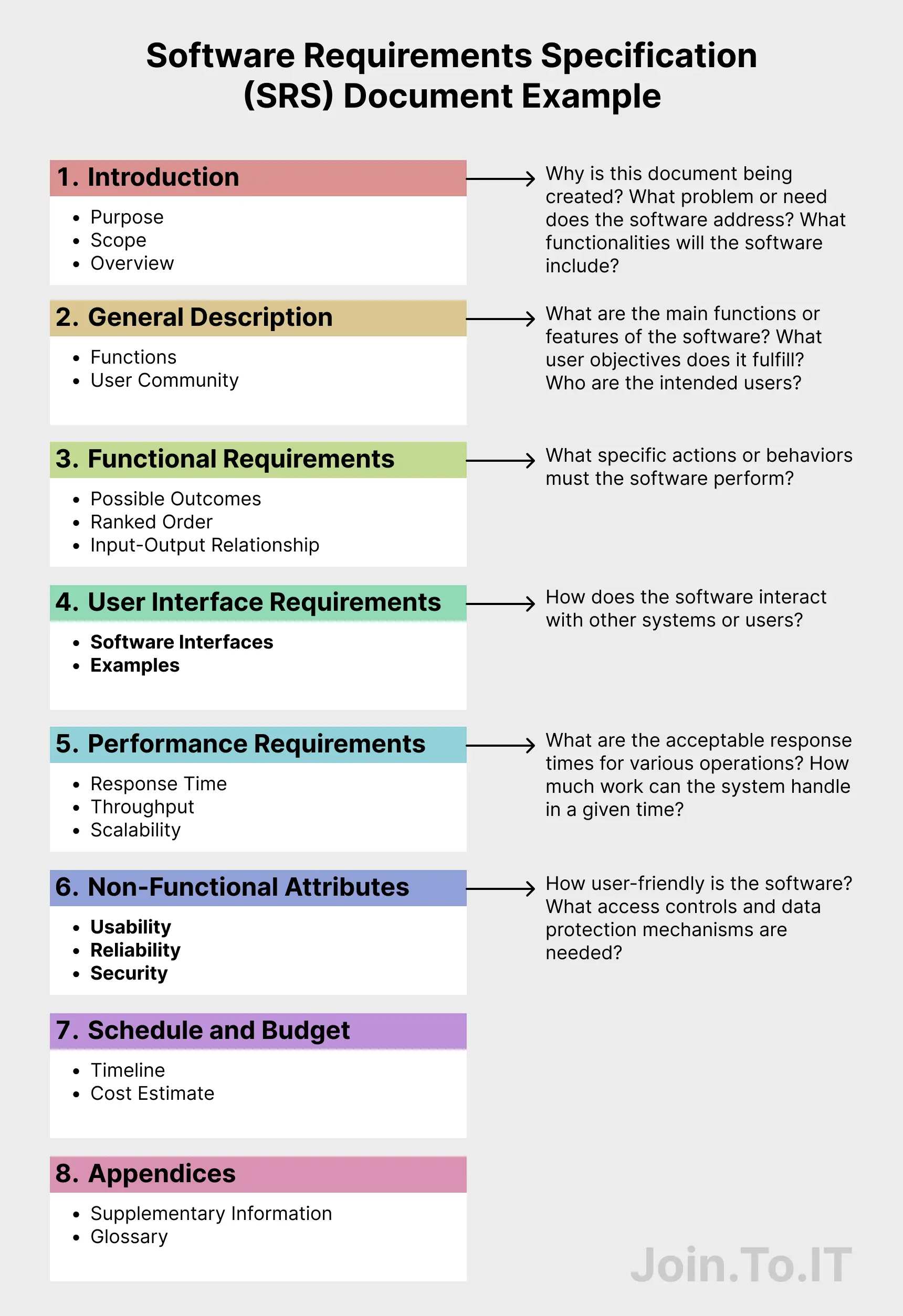
Let’s explore the key components of an SRS document and their significance in the software development process.
- Introduction: The introduction section sets the context for the SRS document. It provides an overview of the software project, including its purpose, objectives, and intended audience. The introduction helps stakeholders understand the scope and importance of the software, creating a foundation for the rest of the document.
- Scope: The scope section defines the boundaries of the software project. It clearly outlines what functionalities and features are included in the software and, equally important, what functionalities are excluded. The scope sets realistic expectations and ensures that both the clients and the development team have a shared understanding of the project's limitations.
- Functional Requirements: Functional requirements describe the specific functionalities and features that the software should possess. These requirements articulate what the software is expected to do, including its core functionalities and any additional features requested by the clients. Functional requirements provide a clear roadmap for the development team, guiding them in building the software according to the clients' needs.
- Non-Functional Requirements: Non-functional requirements define the qualities and constraints that the software must adhere to. These example of software requirement go beyond the core functionalities and focus on aspects such as performance, security, usability, reliability, and scalability. Non-functional requirements help shape the overall user experience and ensure that the software meets specific quality standards.
- User Interface (UI) Requirements: UI requirements outline the design and layout of the software's user interface. This includes details such as the visual elements, navigation, user interactions, and overall user experience. UI requirements help create a user-friendly and intuitive interface, enhancing user satisfaction and usability.
- System Architecture: The system architecture section provides an overview of the software's overall structure and design. It includes details about the hardware and software components, subsystems, and their interactions. System architecture diagrams, such as block diagrams or flowcharts, may be included to visualize the system's structure and help stakeholders understand the software's technical aspects.
- Data Dictionary: The data dictionary is a critical component of an SRS document, especially for database-driven software projects. It provides a detailed description of the data entities used in the software, including data definitions, data types, and relationships between entities. The data dictionary ensures that all stakeholders have a common understanding of the data used in the software and helps maintain data integrity and consistency.
- Assumptions and Constraints: Assumptions and constraints highlight any assumptions made during the requirements-gathering process and any external factors or limitations that may impact the software development. This component helps stakeholders understand the context and constraints within which the software is being developed.
- Dependencies: The dependencies section identifies any external systems, software, or hardware that the software relies on. This includes any APIs, libraries, or third-party services that need to be integrated into the software. Identifying dependencies ensures that the necessary components are available and compatible with the software.
- Use Cases: Use cases provide specific scenarios or interactions between the users and the software. They describe step-by-step sequences of actions and expected outcomes, helping stakeholders understand how the software will be used in real-world situations. Use cases assist the development team in designing the software's behavior and functionality.
- System Constraints: System constraints outline any technical or operational limitations that the software must adhere to. These constraints may include compatibility example software requirements, hardware or software limitations, performance thresholds, or regulatory constraints. System constraints ensure that the software is developed within the specified technical boundaries.
- Risk Assessment: The risk assessment component identifies and assesses potential risks associated with the software project. It includes an analysis of the risks and proposes mitigation strategies to address them. Risk assessment helps stakeholders understand the potential challenges and uncertainties that may arise during the development process, allowing for proactive risk management.
- Glossary: A glossary is an important component of an SRS document, especially when technical terms and acronyms are used. It provides definitions for these terms, ensuring clarity and understanding among stakeholders. The glossary promotes effective communication and avoids confusion caused by unfamiliar terminology.
By including these key components in an SRS document, organizations can ensure a comprehensive and well-documented understanding of the software specification requirements examples. Each component plays a crucial role in defining the software's functionalities, scope, constraints, and quality standards. This clarity and alignment are essential for the success of software development projects.
SRS Template
An SRS template is a fixed outline of sections that every requirements document fills in, so nothing important is skipped. Copy the structure below into a document or wiki page and complete each section for your product.
- Introduction: purpose of the document, intended audience, product scope (what is in and out of scope), definitions and acronyms, references.
- Overall description: product perspective (new product, replacement, or part of an existing system), user classes and personas, operating environment.
- Assumptions, dependencies, and constraints: third-party services and APIs, regulatory rules, technical and budget limits.
- Functional requirements: one entry per requirement with an ID (FR-01, FR-02…), a description, a priority, the source (who asked for it), and acceptance criteria.
- External interface requirements: user interface, APIs and integrations, hardware, and communication channels such as email or push notifications.
- Non-functional requirements: performance, security, availability, scalability, usability, and compliance, each with a measurable target (NFR-01, NFR-02…).
- Data requirements: data dictionary, data retention, and migration from existing systems.
- Use cases and user stories: the main scenarios, linked to the requirement IDs they cover.
- Risks: known risks and how the team plans to reduce them.
- Change log and approvals: version, date, author, summary of changes, and sign-off from stakeholders.
- Appendices: glossary, diagrams, wireframes.
Write each requirement as one testable statement. If a sentence contains “and” or a word like “fast” or “user-friendly,” split it or add a number.
Need an SRS written for your product? We prepare requirements during the discovery phase, before development starts. Contact us to discuss your project.
SRS Example: SaaS Product
Here is how the template looks once it is filled in. The excerpt below covers a B2B task-management SaaS for small teams. This is an illustrative example, not a client project.
Product scope: a web app where teams create workspaces, assign tasks, and track deadlines. Mobile apps, time tracking, and invoicing are out of scope for version 1.
Functional requirements
- FR-01. Workspace invitations. An Admin shall be able to invite members to a workspace by email. An invitation link expires after 7 days.
- FR-02. Tasks. A member shall be able to create a task with a title, description, assignee, due date, and status (To do, In progress, Done).
- FR-03. Roles. The system shall support two roles: Admin (manages members and billing) and Member (works with tasks). Only an Admin can remove a member from the workspace.
Non-functional requirements
- NFR-01. Performance. The task board shall load in under 2 seconds at the 95th percentile for a workspace with 5,000 tasks.
- NFR-02. Security. All traffic shall use TLS 1.2 or higher. Data from one workspace shall never be visible to users of another workspace.
- NFR-03. Availability. The service shall be available 99.9% of the time in each calendar month, excluding announced maintenance windows.
Acceptance criteria
- AC-01 (FR-01). Given an Admin has invited a new email address, when the invitee opens the link within 7 days, then they join the workspace as a Member. When the link is opened after 7 days, the page shows “This invitation has expired.”
- AC-02 (FR-03). Given a user with the Member role, when they open the workspace settings, then the “Remove member” action is not shown, and a direct API request to remove a member returns 403 Forbidden.
Each requirement here has an ID, describes one behavior, and sets a limit that can be measured. A tester can trace AC-02 back to FR-03 and write a test without asking the product owner what “secure roles” means.
Tools for SRS Documentation: Enhancing Clarity and Understanding
When it comes to creating a comprehensive example of software requirement specification, using appropriate tools is vital for gathering and organizing information. These tools not only streamline the SRS development process but also contribute to effective software requirement management. Let's delve into some practical frameworks, incorporating software requirement specification examples:
Context Diagram - A Visual Representation
The context diagram is an excellent software requirements example. It provides a holistic view of the system, displaying its core components and their relationships. For instance, consider an e-commerce platform where customers can browse products, add them to the cart, and proceed to checkout. The context diagram would illustrate the interactions between users, such as customers and administrators, and key system functionalities, like product management and order processing.
Functional Decomposition - Structuring Requirements
In an SRS example, functional decomposition allows breaking down complex functionalities into manageable parts. For a social media application, the essential functionality "Posting a Status Update" can be further decomposed into "Creating a Post," "Adding Media," and "Tagging Friends." This hierarchical approach helps in prioritizing tasks and understanding dependencies between various features.
Use Case Diagram - Representing User Interactions
In the context of a software requirement specification, a use case diagram showcases interactions between users and the software system. For instance, in an online banking application, a use case diagram would outline actions like "Customer Logging In," "Checking Account Balance," and "Transferring Funds." It provides an excellent example of how users engage with the software and what functionalities are available to them.
Sequence Diagram - Visualizing Behavior Over Time
Using a sequence diagram in an SRS example allows for depicting the chronological flow of events and system behavior. For an online booking system, a sequence diagram might show the steps involved in making a hotel reservation, including user inputs, data processing, and reservation confirmation.
AS-IS and TO-BE Process Model - Analyzing Business Processes
An SRS example may incorporate AS-IS and TO-BE process models to understand the current and improved states of business processes. For instance, in a project management tool, the AS-IS model illustrates the existing process for task assignment and tracking, while the TO-BE model demonstrates how the software optimizes these processes, introducing new features like Gantt chart visualization and real-time progress updates.
User Stories - Defining User Interactions
An example of software requirements can showcase user stories to describe various interactions with the software. For a delivery app, a user story might be "As a customer, I want to track my package in real time," which identifies the user, their intention, and the desired outcome.
Mind Maps - Organizing Ideas Collaboratively
Mind maps are valuable in SRS development as they facilitate brainstorming and collaboration. In a mind map for a project management tool, branches could represent core functionalities like task management, team collaboration, and progress tracking.
Using these tools in a software requirement specification example ensures a clear and comprehensive documentation process, enabling effective communication between stakeholders and enhancing the overall success of the software development project.
Managing Changes and Scope Creep
In software development, it's not uncommon for changes to be requested during the development process. However, unmanaged changes and scope creep can have a negative impact on the project timeline and budget, as well as the quality of the final product. That's why it's important to have a plan in place for managing changes and scope creep.
One effective strategy is to establish a formal change management process. This process should outline how changes will be requested, evaluated, and implemented. It should also include a process for communicating these changes to all stakeholders, including the client, development team, and project managers.
Another crucial aspect of managing changes and scope creep is maintaining documentation integrity. This means ensuring that any changes to the requirements are properly documented and that all documentation is up-to-date throughout the development process. By doing so, you can ensure that any changes made to the requirements are traceable and that the final product meets the needs of the client.
Tip: Use version control software, such as Git or SVN, to manage changes to the SRS document and maintain a history of all changes.
Effective communication is also vital in managing changes and scope creep. All stakeholders should be kept informed of any changes to the requirements, as well as their impact on the project timeline and budget. This will help to ensure that everyone is on the same page and that the project is on track to meet its goals.
Example: Unmanaged Changes
Imagine a software development project where changes are allowed to be made without a formal change management process in place. In this scenario, the client continually requests changes to the requirements, causing the development team to change the scope of the project on a regular basis. This leads to delays in the development process and a final product that does not meet the needs of the client.
By implementing a formal change management process, the development team can evaluate each change request and determine its impact on the project timeline and budget. This will enable the team to make informed decisions about which changes to implement and ensure that the final product meets the needs of the client.
In conclusion, managing changes and scope creep is an essential aspect of software development project management. By establishing a formal change management process, maintaining documentation integrity, and communicating effectively with all stakeholders, you can ensure that your project stays on track and meets its goals.
Scope creep starts with unclear requirements.
Let’s review your SRS together.
Collaboration and Communication in SRS Development
At our company, we believe that collaboration and communication are keys to successful SRS development. This is because, during the SRS development process, it is important to ensure that all stakeholders have a clear understanding of the requirements and that the requirements are accurately documented and understood.
Our approach to collaboration is centered on eliciting requirements from all stakeholders, including end-users, project managers, and developers. We also emphasize the importance of holding regular meetings to review requirements and discuss any changes that may have come up during the development process.
Effective communication is also crucial during SRS development. We encourage our clients to provide detailed feedback on the SRS document, to ensure that it covers all their requirements. Additionally, we use tools such as instant messaging, video conferencing, and project management tools to facilitate communication and collaboration between teams and stakeholders.
By emphasizing collaboration and communication, we are able to create SRS documents that accurately reflect the requirements of all stakeholders, resulting in successful software development projects.
SRS in 2026: AI-Assisted Requirements and Agile Teams
In 2026, an SRS is rarely a static file signed once at kickoff. Teams treat it as a living document that changes with the backlog, and many use AI tools to write the first draft.
- AI drafts, human decisions: Language models can turn interview notes, call transcripts, and support tickets into draft requirements. They also find duplicates and flag vague wording such as “fast” or “intuitive.” They cannot set priorities or confirm what the business needs, so a business analyst still reviews every requirement with stakeholders and owns the final text.
- Living documents: The SRS sits in a wiki or in the code repository, with version history and a change log. A change to a requirement goes through review, just like a change to the code, so everyone works from the current version.
- Links to user stories: Agile teams keep the SRS and the backlog connected. Each user story references a requirement ID, such as FR-02, and each requirement lists its acceptance criteria. This shows which requirements are built and tested, and what a change request will affect.
- Requirements for AI features: Products with AI features need requirements of their own: data sources, acceptable error rates, and what the product does when the model is not confident.
The result is a shorter upfront document that stays accurate for the whole project.
Final Thought
At Join.To.IT, we understand the critical role that a software requirements specification document plays in the success of software development projects. We hope that this guide has provided you with valuable insights into the importance of SRS documentation and the best practices for creating effective SRS documents.
By following the guidelines and tips outlined in this article, you can ensure that your SRS document accurately captures and conveys the requirements of your project, facilitates communication between stakeholders, and helps achieve project goals and client satisfaction.
Remember to prioritize collaboration and communication among stakeholders, write clear and concise requirements, and ensure traceability and verification throughout the software development lifecycle. Additionally, take advantage of the various tools and resources available for SRS documentation, such as software tools and online templates and guidelines.
We recommend also reading our article on digital transformation in business.
Related guides
- Project discovery phase: benefits, team roles, and risks
- SaaS MVP development for startups
- How much does it cost to make an app
FAQ
What is SRS documentation?
A Software Requirements Specification (SRS) document is a comprehensive document that outlines the functional and non-functional requirements of a software project. It serves as a blueprint for the development team and ensures that all stakeholders have a clear understanding of the project goals and expectations.
Why is a Software Specification Requirements important in software development?
An SRS document is crucial for successful software development projects as it provides a detailed description of the desired system behavior, functionalities, and constraints. It helps eliminate ambiguity and ensures effective communication between stakeholders, leading to accurate project estimation and client satisfaction.
What are the components of SRS document?
Some key components of an SRS document include an introduction, scope, functional and non-functional requirements, user interface (UI) requirements, system architecture, data dictionary, assumptions and constraints, dependencies, use cases, system constraints, risk assessment, and a glossary of terms. These components help provide a comprehensive understanding of the software requirements.
How does an SRS document contribute to the success of a software development project?
An SRS document plays a crucial role in the success of a software development project. It ensures clear communication between clients and the development team, aligns expectations, manages the project scope, serves as a basis for development and testing, and provides documentation for future reference and maintenance. The SRS document acts as a blueprint that guides the entire development process and ensures that the software meets the clients' requirements.
How has SRS documentation changed in 2026?
An SRS is now a living document rather than a one-time deliverable. Teams use AI tools to draft requirements from interview notes and to flag vague wording, while business analysts review and approve the final text. The document is kept in a wiki or repository with version history, requirements are linked to user stories by ID, and products with AI features add requirements for data sources, error rates, and fallback behavior.
An SRS usually comes out of the discovery phase. See how a product engineering team turns it into a release plan, for example in SaaS product development.
.png.png)