

Here is how to build an AI agent: pick one narrow task, connect a language model to the tools and data it needs, limit what it may do and test it on real cases before launch. A focused pilot takes 3 to 5 weeks, and most of the budget goes to integration and testing, not to the model.
Key takeaways
- An AI agent is a model in a loop: it decides the next step, calls a tool, reads the result and repeats until the task is done.
- Start with the simplest design that works. Many "agent" ideas are better served by a fixed workflow with one or two model calls.
- The model is rarely the hard part. Tool design, permissions and evaluation decide whether the agent is safe to ship.
- Frameworks such as LangGraph, the OpenAI Agents SDK, the Claude Agent SDK and CrewAI save plumbing work, but each pushes you toward a different style of control.
- Budget for running costs from day one: every step of the loop is a paid model call.
What an AI agent is (and isn't)
An AI agent is software where a language model chooses its own next action, calls tools to carry it out and keeps going until it reaches a goal or a stop condition. That loop is the difference between an agent and a chatbot, which only answers the message in front of it.
Anthropic draws a useful line between the two designs teams mix up most often. In a workflow, your code decides the path and the model fills in steps. In an agent, the model decides the path (Anthropic, Building effective agents). Workflows are cheaper and more predictable. Agents earn their cost only when the number of steps cannot be known in advance.
| Chatbot | Workflow with LLM steps | AI agent | |
|---|---|---|---|
| Who decides the next step | The user | Your code | The model |
| Calls tools and APIs | Rarely | Yes, in a fixed order | Yes, in any order it chooses |
| Typical job | Answer questions from a knowledge base | Classify a ticket, draft a reply, route it | Investigate a failed order across three systems and fix it |
| Predictability | High | High | Lower, needs guardrails and evaluation |
| Cost per task | Lowest | Low | Highest, grows with the number of steps |
If you are still deciding between a conversational assistant and a custom bot, our comparison of custom chatbots and GPT-powered assistants covers that choice.
7 steps to build an AI agent
Building an AI agent follows seven steps: choose the use case, prepare the data, pick the model, define tools, decide on memory, add guardrails and set up evaluation. Skipping any of them shows up later as an agent that works in the demo and fails with real users.
1. Choose one use case with a clear finish line
Pick a task that a person on your team does today, repeats often and can judge as done or not done. "Reconcile vendor invoices against purchase orders and flag mismatches" is a good agent task. "Help the finance team" is not.
Write down three things before any code: the inputs the agent gets, the result it must produce and the actions it is allowed to take. If you cannot describe a correct result, you will not be able to test the agent either. This is also the first thing we ask for in AI development and integration projects: a one-page task description saves weeks later.
2. Map and prepare the data
List every source the agent needs to read: documents, database tables, CRM records, tickets. For each one, note who owns it, how fresh it must be and whether it holds personal or regulated data.
Unstructured knowledge, such as policies or product manuals, usually goes into a search index the agent can query (retrieval-augmented generation, or RAG). Structured data stays where it is and is reached through tools. Copying a whole database into a prompt is slow, expensive and a privacy risk.
3. Pick the model
Choose the model by testing it on your own task, not by leaderboard rank. Run 20 to 50 real examples through two or three candidate models and compare accuracy, speed and cost per task.
Most business agents run on a hosted model through an API. You rarely need to train your own model. Fine-tuning makes sense later, if a cheaper model needs to match a stronger one on a narrow, high-volume task.
4. Define the tools and actions
Tools are the functions the agent can call: search orders, read a contract, create a ticket, send an email. Each tool needs a clear name, a description written for the model and strict input parameters.
Treat tool design as seriously as prompt design. Anthropic's engineers report that changing tool parameters so mistakes are harder to make removed a whole class of errors (Anthropic). Split read tools from write tools, so you can grant them separately.
The Model Context Protocol (MCP) is now a common way to expose tools to agents. The OpenAI Agents SDK and the Claude Agent SDK both support MCP servers (OpenAI Agents SDK, Claude Agent SDK), so a tool written once can serve agents built on different stacks.
5. Decide what the agent remembers
Memory comes in two kinds. Short-term memory is the working context of the current task: messages, tool results and notes. Long-term memory persists across sessions: user preferences, past decisions, facts learned earlier.
Most first versions need only short-term memory plus access to your systems of record. Add long-term memory when you see the agent asking users the same questions again. Store it in your own database, with the same access rules as any other customer data.
6. Add guardrails and human approval
Guardrails limit what the agent can do and check what goes in and out. Start with permissions: the agent gets the minimum set of tools for its task, and any action that spends money, deletes data or contacts a customer needs human approval at first.
Add input checks for prompt injection, output checks for format and policy, a cap on loop steps and a cap on cost per task. OWASP lists prompt injection and excessive agency among the top risks for LLM applications (OWASP Top 10 for LLM Applications 2025).
7. Evaluate before and after launch
Build a test set of 50 to 200 real cases with known correct outcomes before launch. Run it on every change to the prompt, tools or model, and track the pass rate, cost per task and number of steps.
After launch, log every run with its tool calls. Review failed and expensive runs weekly. Most improvements come from fixing tools and instructions that this review uncovers, not from switching models.
Pre-launch checklist
- The task has written inputs, outputs and a definition of "done"
- Every data source has an owner and an access rule
- The model was chosen on your own test cases
- Read and write tools are separate; write tools need approval at first
- Step limit, cost limit and timeout are set per task
- Inputs from users and documents are checked for injected instructions
- A test set with known answers runs on every change
- Every run is logged with tool calls, cost and outcome
- A person can see, pause and override the agent
Reference architecture of an AI agent
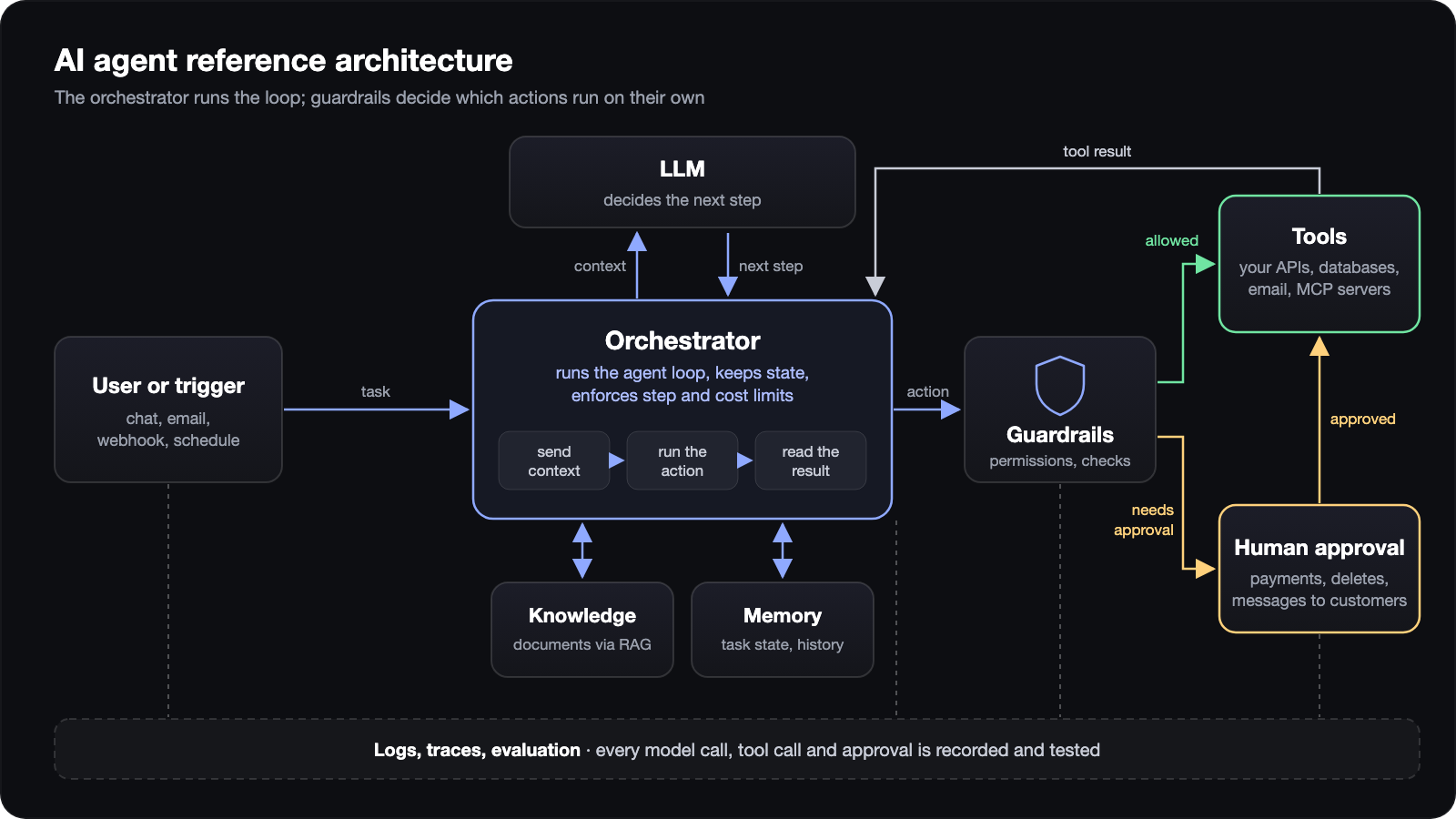
A production AI agent has six parts: an interface, an orchestrator that runs the loop, the model, tools, a knowledge store for retrieval and a monitoring layer. The orchestrator is the center: it sends context to the model, executes the tool calls the model asks for and enforces the limits.
| Component | What it does | Typical options |
|---|---|---|
| Interface | Receives requests: chat, email, webhook, schedule | Web app, Slack, API endpoint |
| Orchestrator | Runs the loop, keeps state, enforces limits | An agent framework or your own code |
| Model | Decides the next step and writes outputs | Hosted LLM through an API |
| Tools | Act on your systems | Your APIs, MCP servers, SaaS APIs |
| Knowledge store | Finds relevant documents for the task | Vector or hybrid search index |
| Memory and state | Keeps task context and long-term facts | Your database |
| Monitoring | Records runs, cost, failures; runs evaluations | Tracing built into the framework, or a separate tool |
For multi-step jobs, the orchestrator can also hand parts of a task to specialized sub-agents. Use that only when one agent with good tools stops coping: each extra agent adds model calls, cost and new ways to fail.
AI agent frameworks compared: LangGraph, OpenAI Agents SDK, Claude Agent SDK, CrewAI
Agent frameworks handle the loop, state, tool calling and tracing, so your team writes business logic instead of plumbing. The four below are widely used options, and they differ mainly in how much control flow you define yourself. All facts are from each project's official docs and repositories, checked on October 23, 2026.
| LangGraph | OpenAI Agents SDK | Claude Agent SDK | CrewAI | |
|---|---|---|---|---|
| Style | Low-level graph of steps and state | Light library: agents, handoffs, guardrails | Claude Code's agent loop as a library | Role-based teams of agents (Crews) and event-driven Flows |
| Languages | Python, JavaScript/TypeScript | Python, JavaScript/TypeScript | Python, TypeScript | Python |
| Models | Any, through integrations | OpenAI by default, 100+ other models via adapters | Claude models | OpenAI by default, other providers and local models |
| Built in | Durable execution, human-in-the-loop, short- and long-term memory, streaming | Guardrails, handoffs, sessions, tracing, MCP, human-in-the-loop | File, command and web tools, permissions, hooks, subagents, sessions, MCP | Memory, knowledge, guardrails, human-in-the-loop triggers |
| License | MIT | MIT | Anthropic Commercial Terms | MIT |
| Best fit | Complex, long-running processes where you need to see and control every step | Teams already on OpenAI who want a small, readable codebase | Agents that work with files, code and documents, with fine-grained permissions | Fast prototypes of multi-role processes |
| Watch out for | More code to write; the learning curve is real | Simplest with OpenAI models; other providers go through adapters | Tied to one model vendor | Multi-agent designs can use many more model calls than needed |
Sources: LangGraph repository, OpenAI Agents SDK repository, CrewAI repository.
You can also skip frameworks. Anthropic recommends starting with direct API calls, because framework layers can hide prompts and make debugging harder (Anthropic). For a single agent with five tools, plain code is often clearer. A framework pays off once you need durable state, approvals and tracing.
How much does it cost to build an AI agent?
The cost of an AI agent has two parts: the one-time build and the monthly cost to run it. The build cost depends mostly on the number of systems the agent connects to and on how strict testing must be. The run cost depends on how many tasks it handles and how many model calls each task takes.
| Scope | What it includes | Build timeline | Build cost |
|---|---|---|---|
| Pilot | One task, 2–3 read-only tools, test set, internal users | 3–5 weeks | $6,000–$10,000 |
| Production agent | Write actions with approval, 5–10 integrations, monitoring, security review | 2–4 months | $20,000–$40,000 |
| Multi-agent system | Several agents or sub-agents, shared memory, complex approvals | 4–6 months | $45,000–$80,000 |
These are Join.To.IT estimates at a blended rate of $25 per hour for engineering, QA and project management. They exclude model and hosting bills, which you pay to the providers directly.
What drives the build cost
- Integrations. Each system the agent reads from or writes to needs a tool, access rules and tests. Legacy systems without an API cost the most.
- Data preparation. Messy, duplicated or scattered documents need cleaning before retrieval works.
- Risk level. Agents that move money or talk to customers need more guardrails, approvals and testing.
- Evaluation. A good test set takes real effort from the people who know the task.
What drives the monthly cost
- Model usage. You pay per token for every step of the loop. An agent that takes 15 steps per task costs several times more than one that takes 3.
- Hosting and storage for the orchestrator, search index and logs.
- Monitoring and review time, which is a people cost, not a cloud cost.
For an internal agent that handles a few hundred tasks a month, the model bill is usually tens to low hundreds of dollars. A customer-facing agent with thousands of conversations can reach several thousand. Plan for 10–20 hours of maintenance a month as well ($250–$500 at $25 per hour): reviewing failed runs, updating prompts and tools, and re-running tests after model updates.
To cut run costs, route simple steps to a smaller model, cache repeated context and cap the number of steps. For a wider view of what AI projects return, see real ROI examples from AI integration. Chatbot-specific budgets are covered in our guide to AI chatbot development tools, costs and timeline.
Common failure modes
AI agents fail in predictable ways, and most of them trace back to tools, permissions or missing tests rather than to the model. Knowing them early saves a rebuild.
| Failure | What it looks like | How to prevent it |
|---|---|---|
| Loops | The agent repeats the same tool call or never decides it is done | Step limit, cost limit, clear "done" criteria in the instructions |
| Wrong tool or wrong arguments | It searches the wrong system or passes bad IDs | Fewer, better-named tools; strict parameter types; test cases for each tool |
| Prompt injection | Text in an email or document tells the agent to do something else | Treat all retrieved content as data, check inputs, require approval for risky actions |
| Excessive permissions | The agent can delete or send things it never needs to | Least privilege; separate read and write tools; approvals |
| Silent quality drop | A model or prompt change breaks cases nobody re-tested | Automated test set on every change; weekly review of failed runs |
| Runaway cost | Long contexts and extra steps multiply token spend | Smaller models for simple steps, context trimming, per-task budget |
| Stale knowledge | Answers based on outdated documents | Owners and refresh schedules for every data source |
The middle three rows map directly to OWASP's LLM01 Prompt Injection and LLM06 Excessive Agency (OWASP). Fix those before you scale the number of users.
Build in-house vs hire a team
Build in-house when you have engineers who know your systems and can spend several months learning evaluation and LLM security. Hire a team when you need a working agent sooner, when integrations are the bulk of the work or when nobody on staff has shipped one before.
| Question | In-house fits if | Outside team fits if |
|---|---|---|
| Do you have backend engineers with free capacity? | Yes, for several months | No, or they are on the core product |
| Has anyone on staff shipped an LLM feature to production? | Yes | No |
| How many systems must the agent touch? | One or two, with good APIs | Several, including legacy ones |
| Who will maintain it after launch? | Your team | Your team after handover, or a support contract |
A mixed model works well: an outside team builds the first agent with your engineers, then hands over the code, tests and runbooks.
How Join.To.IT can help
Join.To.IT designs and builds AI agents that connect to the systems a business already runs: CRMs, ERPs, field-service platforms and custom databases. We start with one task and a test set, ship a pilot with read-only tools and add write actions with approvals once the pilot passes its tests. You keep the code, prompts and evaluation suite.
We use the same approach in-house. Our finance assistant reads bank statements, vendor invoices and HR tickets from our ERP, and company mail, through MCP connectors we built for it. Every connector is read-only except one action, replying to a ticket, and the agent may take it only after a person sees the exact text and confirms. Missing values come back as empty, never as zero, so the agent cannot invent a balance. The first two connectors were working in about two weeks.
See our AI development and integration services or tell us about your use case.
FAQ
How long does it take to build an AI agent?
A focused pilot with one task and a few read-only tools takes 3 to 5 weeks. A production agent with write actions, several integrations, monitoring and a security review usually takes 2 to 4 months, mostly because of integration and testing work. The fastest projects have a clear task, clean data access and someone on the client side who can judge results.
Do I need my own model to build an AI agent?
No. Most business agents run on a hosted model through an API, such as models from OpenAI, Anthropic or Google. Your advantage comes from your data, tools and evaluation, not from the model weights. Training or fine-tuning becomes worth it only for narrow, high-volume tasks where a smaller tuned model can match a larger one at a lower cost per task.
How do you keep an AI agent from taking wrong actions?
Give the agent only the tools its task needs and separate reading from writing. Require human approval for actions that spend money, delete data or contact customers, at least until test results justify removing it. Add step and cost limits, check inputs for injected instructions and log every tool call. A test set run on every change catches regressions before users do.
What does an AI agent cost to run per month?
The monthly cost is mostly model usage, plus hosting, storage and monitoring. Model usage depends on tasks per month, steps per task and the model you choose, so an agent that needs 15 steps per task costs several times more than one that needs 3. An internal agent with a few hundred tasks a month usually costs tens to low hundreds of dollars in model usage. Add 10–20 hours of maintenance, or $250–$500 at $25 per hour.